


Dog-Friendly Places Map
Explore dog-friendly parks, services, and places using the map and its features.
Catalog
- How do I filter businesses by specific services?
- How do I filter dog parks by specific amenities?
- How do I change the map to satellite mode?
- How do I suggest a missing dog-friendly park or business on the map?
- How do I vote for the amenities at a dog park?
- How do I rate and review a dog park?
- How do I check-in to a dog park?
- How do I search for a dog park or dog-friendly park nearby?
How do I filter businesses by specific services?
If you’re looking for a specific type of dog-friendly business and want to filter the map by services offered, DogPack has two was to filter for them:
1. Using the Map Tab:
Click the Filter button in the top right corner
Click the Businesses tab at the top of the filter
Select the services you want, such as Dog Training, Dog Friendly Cafe, Veterinarian, etc.
Click Apply to see businesses with your selected services on the map
2. Using the Search Tab
Tap the main app search button icon
Select the Businesses tab at the top of the page
Click the Filter icon in the top right corner
Select the desired services and click Apply to see businesses with your selected services in the search view.
How do I filter dog parks by specific amenities?
If you're looking for a dog-friendly area with specific amenities, DogPack has two ways to filter for them:
1. Using the Map Tab:
Go to the Map tab.
Click the Filter button in the top-right corner.
Select the amenities you want, such as off-leash areas, obstacles, or swimming areas.
Click Apply to see parks with your selected amenities on the map.
2. Using the Search Tab:
Tap the main app search button toolbar.
Select the Parks tab and then click the Filter button.
Select your desired amenities and click Apply to see parks with your selected amenities in the search view.
How do I change the map to satellite mode?
Changing the map to satellite mode is a great way to see how a park looks before going there.
To change the default setting of the map to satellite mode, start by heading over to the map tab. On the right side of the map there is a square with a map icon, here you can choose the map type.
How do I suggest a missing dog-friendly park or business on the map?
If you notice a dog-friendly park or business missing from the map, you can suggest it directly in the app. Go to the Map tab and tap the grey pin with the plus (+) icon in the bottom-right corner. Place the pin on the correct location on the map, add the required details, and submit your suggestion.
Our team reviews all submissions within 24 hours. Once your suggestion is approved, you’ll receive a notification letting you know it’s live on the map.
How do I vote for the amenities at a dog park?
To vote for the amenities of a dog park, start by heading to the park page you would like to vote for. Navigate to the Map tab and find the park you are at by clicking on its pin.
Once on this page, click on the plus icon in the bottom right corner of the screen and select “Add amenities”.
You will now have the option to vote for all of the amenities at the dog park, which will help other fellow dog owners find a suitable dog park for them and their dog.
If something at the park changes, you can update your amenities vote by clicking on the plus icon again.
How do I rate and review a dog park?
To rate and review a dog park, start by heading to the park page for the location you want to review.
Follow these steps:
1. Navigate to the Map tab and find the park you are at by clicking on its pin.
2. Once on the park page, look for the green plus icon at the bottom-right corner of the page and click on it. Select “Add review”.
3. A form will open where you can provide a rating and write your review of the park.
4. After completing your review, click the “Confirm” button.
5. You’ll then be directed to the amenities section, where you can vote on the amenities available at the park.
6. Click “Confirm” again, and your review will be submitted successfully.
Your feedback helps improve the DogPack community and assists other dog owners in finding the best parks!
How do I check-in to a dog park?
Before checking in to a dog park, make sure that location services are enabled for the DogPack app, as the feature will not work without it.
To check-in, you must be at the dog park. Once you’re there, go to the Map tab and click on the park’s pin. A pop-up will appear with the park details, where you can click the “Check-in” button.
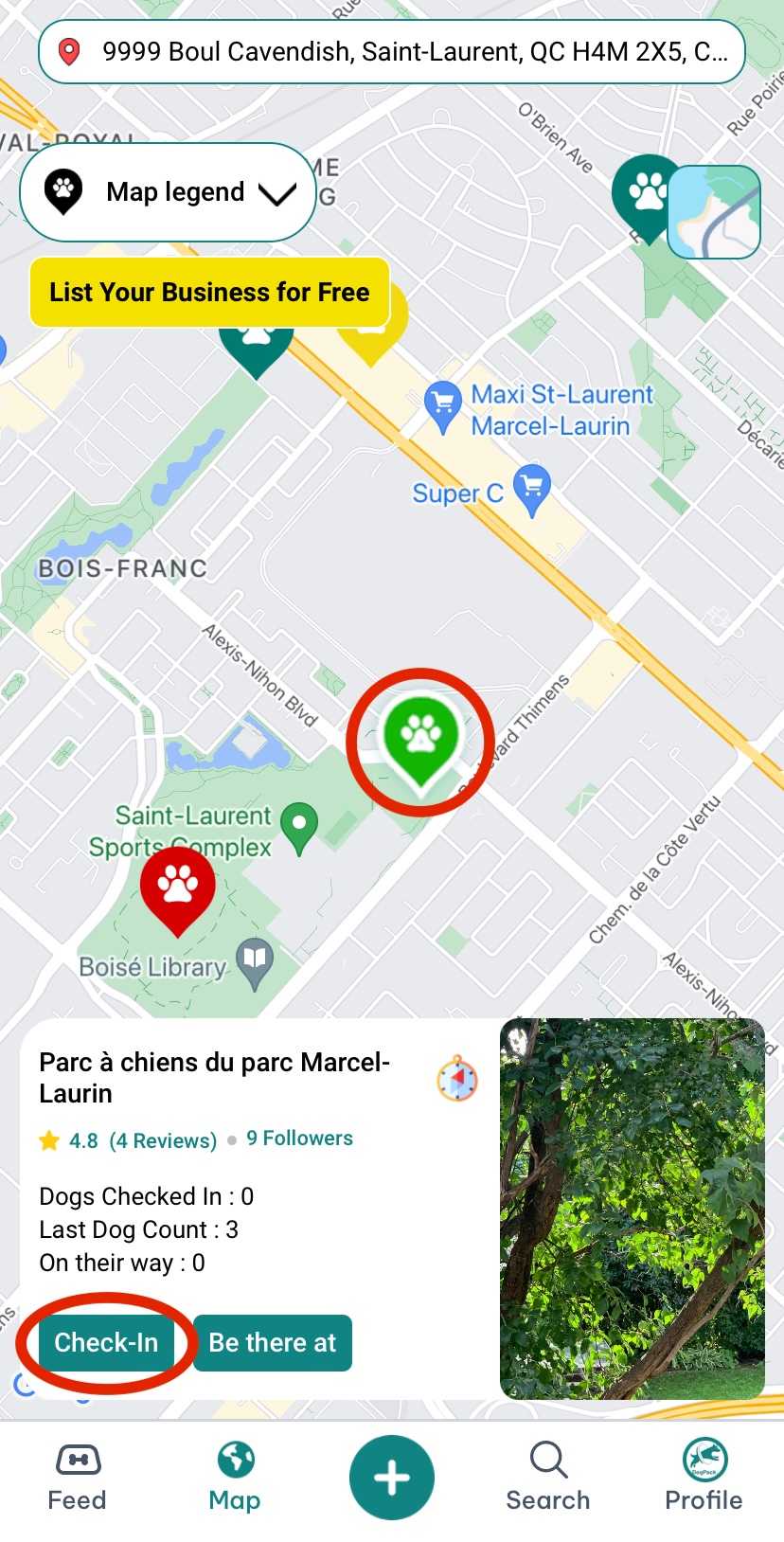
If your check-in is successful, the park's pin will display a white border around it, indicating that you are checked in. Everyone who follows that dog park will be notified that you just checked-in.
How do I search for a dog park or dog-friendly park nearby?
Open the Map tab in the app to see nearby parks. Dog parks are shown as green pins, and dog-friendly parks are shown as red pins. You can search for a specific location to jump directly to that area on the map.
You can also move around the map freely, and the pins will update automatically as you explore different areas. If you prefer browsing by list, tap the List View button on the map to see the same parks and details in a list format.