




























Orders
View and manage customer orders, create shipping labels, update fulfillment status, and track shipments.
Catalog
- How should I fulfill my orders if my store is connected with Shopify?
- If I purchase a shipping label from DogPack, will the buyer be notified?
- If I don’t want to buy a shipping label from DogPack, how can I fulfill an order?
- Can I cancel or refund an order from Shopify if my store is connected to Shopify?
- How can I see which emails were sent to the buyer for an order?
- How can I edit the weight of an order to get a more accurate shipping price before buying a label?
How should I fulfill my orders if my store is connected with Shopify?
If your store is connected with Shopify, all DogPack orders will automatically appear in your Shopify admin panel just like a regular Shopify order.
You should fulfill the order directly from Shopify as you normally would. Once the order is marked as fulfilled in Shopify, it will automatically be marked as fulfilled in DogPack as well. DogPack will then notify the buyer by email with their tracking information and any updates related to the order status.
Please do not send order or shipping emails to the buyer from your Shopify system. All required order confirmations, tracking updates, and status notifications are already handled and sent by DogPack to avoid duplicate or confusing emails for the buyer.
If I purchase a shipping label from DogPack, will the buyer be notified?
Yes. Once you purchase a shipping label through DogPack, the order is automatically marked as fulfilled.
The buyer will receive an email with their tracking details and will continue to receive updates as the package is shipped and moves through transit until it is delivered.
If I don’t want to buy a shipping label from DogPack, how can I fulfill an order?
You can still fulfill your order using your own shipping provider. The process depends on whether your store is connected to Shopify or not.
If your store is connected with Shopify, simply purchase your shipping label in Shopify and fulfill the order there as you normally would. The fulfillment status and tracking information will automatically sync back to DogPack.
If your store is not connected with Shopify, you can manually fulfill the order directly from the DogPack seller panel. When doing so, you will have the option to enter the tracking number and carrier information from the label you purchased elsewhere. This allows the buyer to stay updated with their order status and tracking just like a normal shipment.
Can I cancel or refund an order from Shopify if my store is connected to Shopify?
No. All cancellations and refunds must be processed directly through the DogPack seller panel.
If you cancel or refund an order inside Shopify, it will not update the order status in DogPack. This can cause inconsistencies between systems and may result in incorrect order tracking or payout issues.
To ensure everything stays synchronized, always manage cancellations and refunds from within DogPack.
How can I see which emails were sent to the buyer for an order?
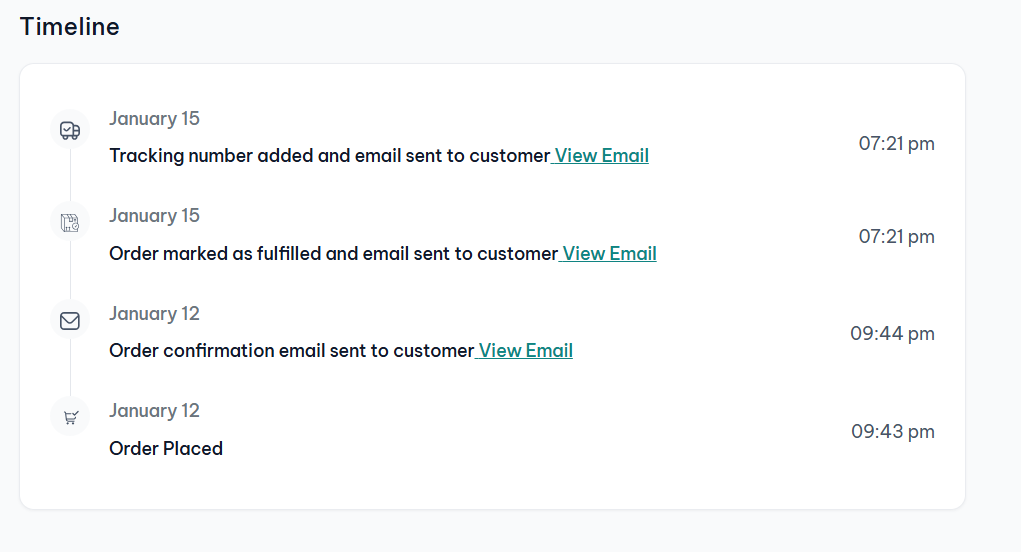
You can view all buyer emails directly from the order’s Timeline.
Open the order details page and scroll to the bottom to find the Timeline section. This area tracks every action taken on the order. Any event that triggered an email will clearly show that an email was sent.
You can also click View Email next to each event to see the exact message that was sent to the buyer. This lets you confirm what communication the buyer received and when it was delivered.
How can I edit the weight of an order to get a more accurate shipping price before buying a label?
When you click Purchase a shipping label from the order details page, you will be taken to a review screen where you can verify all shipping information.
In this screen, look for the Product details & packaging section. Here you can see the total weight of the products in the order and edit the weight if needed to make it more accurate.
You also have the option to save the updated product weight. This ensures that future orders for the same product will automatically use the correct weight, helping you get more accurate shipping prices going forward.