


Getting Started
Learn how to sign up as a seller and complete the initial steps required to start selling on DogPack.
Catalog
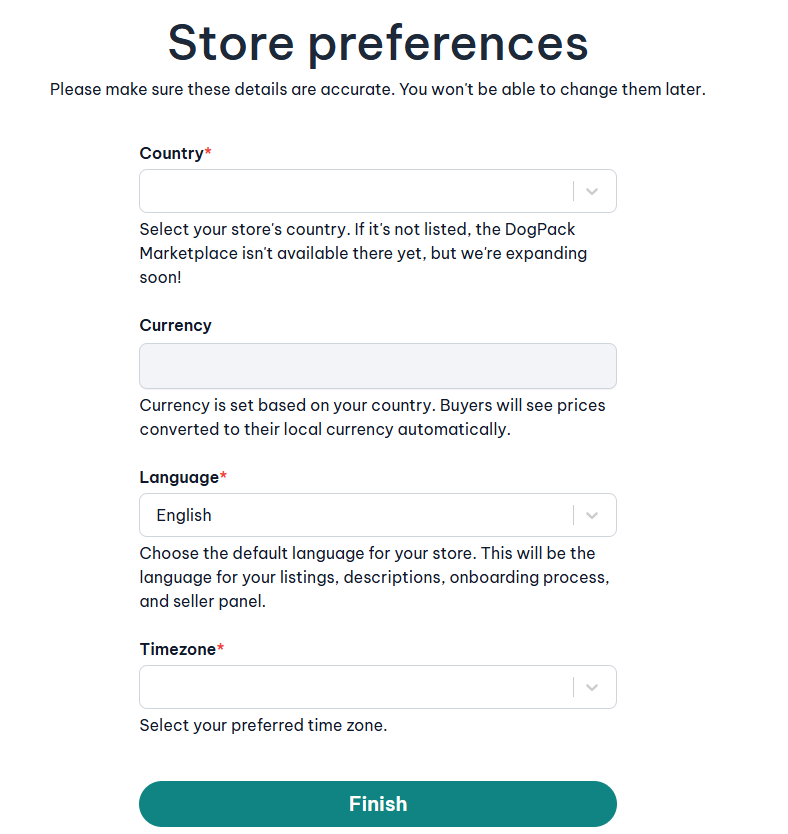
Why is it important to set my Store Preferences correctly before finishing signup?
Your Store Preferences are permanent and define how your store operates on the DogPack Marketplace. Once you complete this step, these settings cannot be changed later, so it’s important to review them carefully before clicking Finish. They affect your pricing, payments, order timing, and how your store is displayed to buyers.
Here’s what each field controls:
Country
This determines where your store is based and whether the DogPack Marketplace is available in your region. It also affects payment setup, tax handling, and marketplace compliance.Currency
Your store’s main currency is automatically set from your selected country. This is the currency you price your products in and receive payouts in. Buyers will still see prices converted to their own local currency automatically.Language
This is the default language for your store, including your product listings, descriptions, onboarding flow, and the seller panel interface. Choose the language you will use to manage your business.Timezone
This controls how order times, payouts, reports, and activity logs are displayed in your seller panel. It should match the timezone you operate your business from.
Before finishing signup, double-check all values to make sure they reflect how you want your store to run, as these preferences become the foundation of your seller account.
What steps must be completed before my store and products go live?
Before your store and products become visible on the DogPack Marketplace, all onboarding steps must be completed. Each step is required to make sure your store is fully set up, ready to accept orders, and able to receive payouts.
You can click on any of the steps below to view detailed instructions for that specific section.
The required steps are:
Store details
Create your first product listing
Set up shipping and packaging
Create at least one store policy
Set up payout details
Subscribe to a plan
Once all six steps are completed, your store and products will go live on the marketplace and you can start earning.